



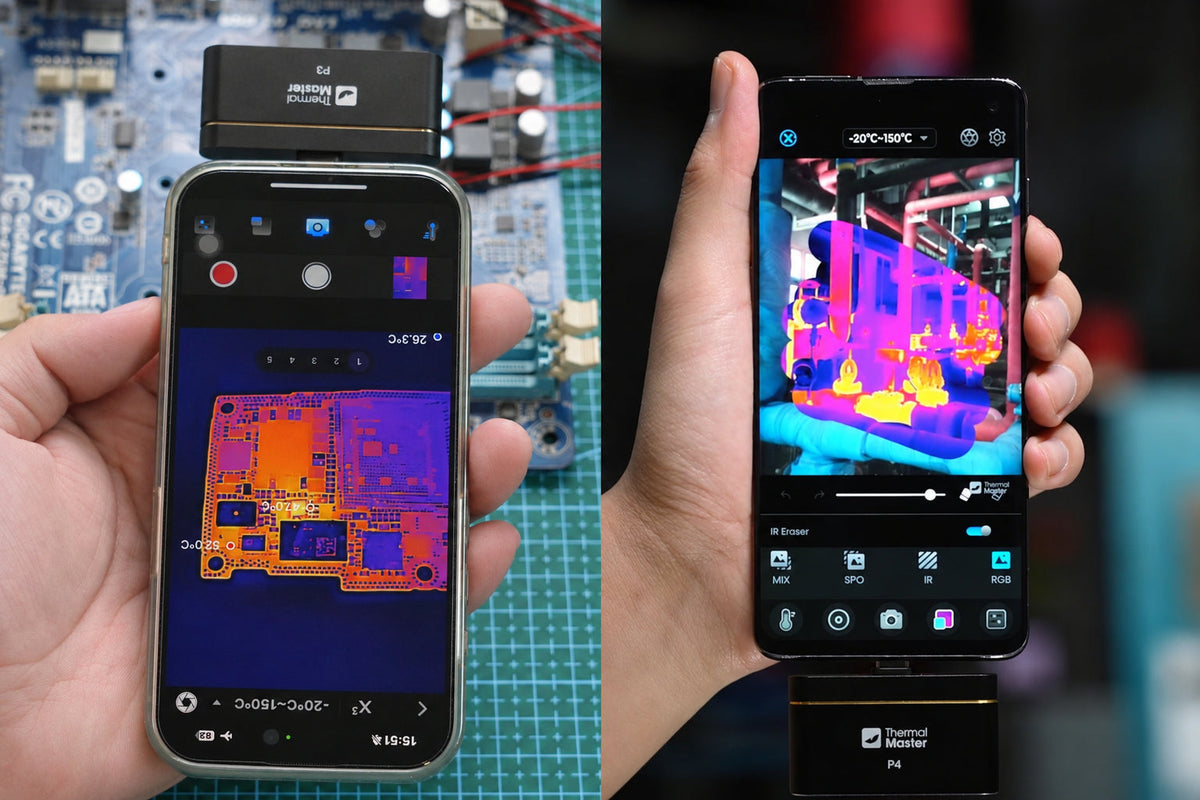
When it comes to professional inspections, the Thermal Master P3 and Thermal Master P4 bring thermal imaging to your smartphone. Designed for electricians, electronics repair technicians, HVAC professionals, and home inspectors, both offer a convenient way to spot potential problems without carrying a separate handheld thermal camera.
P3 vs P4: What's the Difference?
The main difference between the Thermal Master P3 and P4 lies in their lens design and imaging features.
P3 features a manual focus lens, allowing you to adjust image sharpness when inspecting small PCB components or equipment at different distances. Its 8mm macro capability is particularly useful for electronics troubleshooting.
P4 features AI Dual-Lens Imaging, combining infrared and visible-light information to help identify where a hotspot is located. Its IR Eraser, Pro-Mix, and IR-Fuse features make it useful when inspecting electrical panels and HVAC equipment.
Both cameras offer 512×384 X³ thermal imaging and professional temperature measurement tools. The choice comes down to whether adjustable focus or visible-light integration matters more to your work.


The P3 on the left features a large manual focus ring, allowing you to adjust focus for close-up PCB inspections or spotting birds at a distance. The P4 on the right has two lenses for infrared and visible-light imaging. With IR Eraser, you can swipe to reveal thermal details in any area of a visible-light image, or vice versa.
P3 vs P4: Specs Comparison
The P3 and P4 have similar core specifications, with key differences in their lenses, field of view, power consumption, and phone compatibility.
|
Specification |
Thermal Master P3 |
Thermal Master P4 |
|
IR Resolution |
256×192 |
256×192 |
|
Super Resolution |
512×384 |
512×384 |
|
NETD |
<35 mK |
<35 mK |
|
Temperature range |
−20°C to 600°C |
−20°C to 600°C |
|
Temperature accuracy |
±2°C or ±2% |
±2°C or ±2% |
|
Frame rate |
25 Hz |
25 Hz |
|
Focusing |
Manual focus |
Fixed focus |
|
Visible-light camera |
No |
Yes |
|
Phone compatibility |
iPhone and Android |
Only Android |
These differences become more apparent when comparing their imaging performance and everyday use.
Thermal Image Quality and Everyday Use
Both the Thermal Master P3 and P4 offer 512×384 X³ thermal imaging, but their different lens designs and imaging features affect how you use them in everyday inspections.
P3: Manual Focus for Detailed Inspections
Thermal Master P3 combines manual focus with detailed thermal imaging, making it useful for PCB repair, electronics troubleshooting, home inspections, and outdoor observation.
For example, when checking a MacBook logic board, you can turn the P3's manual focus ring to sharpen the thermal image and move closer to examine small components. If a power management chip or MOSFET shows unusual heat, you can narrow down the area for further testing.
The adjustable focus also comes in handy when inspecting equipment at different distances. You can move from checking a power adapter or insulation gap to spotting birds in trees without changing cameras.
Key Applications:
- PCB Inspection
- Electronics Troubleshooting
- Home Inspection
- Bird Watching


The left image was taken with the P3. Its manual focus makes individual SMD components clearly visible. The right image was taken with the P4. Although slightly blurry, it still shows where the hottest spot is.
P4: AI Dual-Lens Imaging for Equipment Inspections
Thermal Master P4 combines infrared and visible-light imaging, making it useful for electrical inspections, HVAC maintenance, equipment troubleshooting, and home inspections where identifying the exact location of a hotspot matters.
For example, when inspecting an electrical panel, you might notice a hotspot near several circuit breakers. With the P4, you can use IR Eraser to swipe across the thermal image and reveal the visible-light view underneath. This helps you identify the breaker or connection that needs further inspection without switching between separate images.
The same imaging features are useful when checking HVAC equipment, motors, and building surfaces. By matching temperature differences with visible equipment details, you can identify suspicious areas more easily.
Key Applications:
- Electrical Inspections
- HVAC Maintenance
- Equipment Troubleshooting
- Home Inspection


The left image was taken with the P4. Its AI Dual-Lens Imaging combines infrared and visible-light details, making it easier to identify engine components. The right image was taken with the P3, showing clear thermal details in infrared mode.
P3 vs P4: Which Should You Buy?
Thermal Master P3 is a great choice for PCB repair and electronics troubleshooting. Its manual focus and 8mm macro imaging help technicians examine small components and locate potential hotspots.
Thermal Master P4 is well suited for electrical and HVAC inspections. By combining thermal and visible-light imaging, it helps users identify hotspots on specific breakers, connections, and equipment components.
Both cameras are also useful for home inspections, helping identify unusual temperature patterns associated with insulation gaps, air leaks, and possible moisture issues. The P3 offers flexible focusing, while the P4's AI Dual-Lens Imaging helps users match thermal hotspots with visible details to locate potential problems.
Your budget, phone compatibility, and how often you use thermal imaging are also worth considering. Whether you're troubleshooting a circuit board or checking an electrical panel, the right choice depends on which features best support your daily work.
FAQ
Can Thermal Master P3 and P4 Record Thermal Videos?
Yes. Both cameras support thermal image capture and video recording through their companion apps, allowing users to document inspections and review findings later.
Do Thermal Master P3 and P4 Need Batteries?
No. Both cameras draw power directly from the connected smartphone, so you don't need to charge a separate battery before an inspection.
Can You Measure Temperatures Directly on Thermal Images?
Yes. Both cameras support point, line, and area temperature measurements, making it easier to check specific hotspots and compare temperatures across different components.
Do Thermal Cameras Work in Complete Darkness?
Yes. Both the P3 and P4 can detect infrared radiation without visible light. However, the P4's visible-light imaging features need sufficient light to capture clear visual details.

Hinterlasse einen Kommentar
Alle Kommentare werden vor der Veröffentlichung geprüft.
Diese Website ist durch hCaptcha geschützt und es gelten die allgemeinen Geschäftsbedingungen und Datenschutzbestimmungen von hCaptcha.