



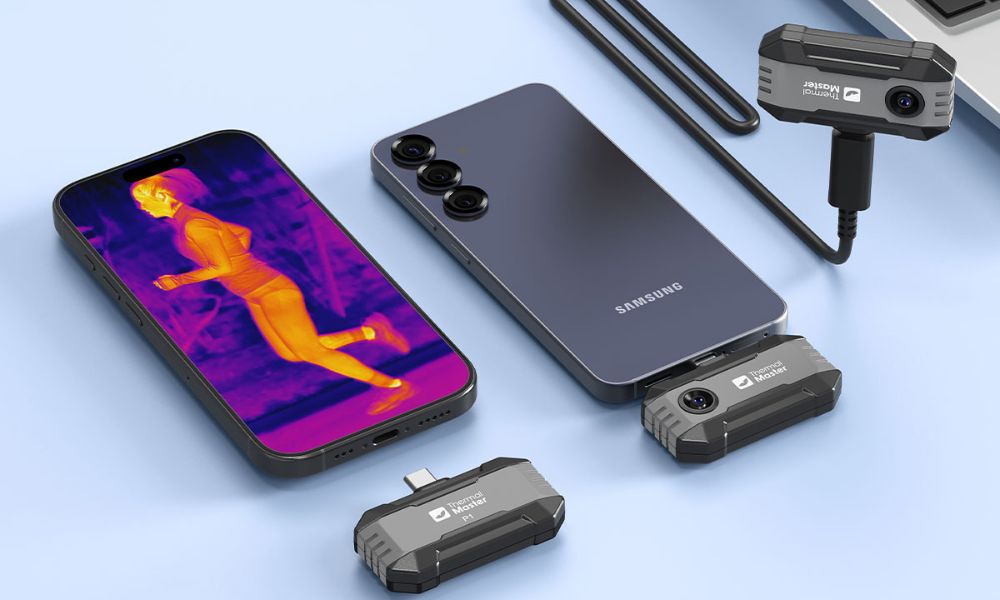
With the right thermal imaging camera, an Android phone can become a practical thermal imaging inspection tool. Below, we've reviewed the best thermal imaging cameras for Android and helped you understand which features are most important in different use cases, from home checks to professional diagnostics.
Can an Android Phone Be a Thermal Camera?
Yes, Android phones can act as thermal imagers, but only if an external thermal imaging camera is connected. This is because Android phones themselves cannot detect infrared heat sources. Only when used with an external thermal imaging camera can an Android phone display real-time thermal images, measure surface temperatures, and record photos or videos, making it ideal for tasks such as house inspections, electrical testing, and leak detection.
What Are the Benefits of Using a Thermal Camera on Android?
- Portable and Convenient: Smartphone-based thermal imagers are lightweight and easy to use, allowing you to perform thermal imaging inspections anytime, anywhere. They can also be used for quick inspections at home, on construction sites, or while traveling.
- Instant Visualization of Heat: Thermal imagers convert invisible infrared radiation into clear, visible images, allowing you to detect temperature differences instantly. Identify heat loss, overheated components, or hidden problems invisible to the naked eye.
- Wide Range of Applications: Using thermal imagers on Android systems enables a variety of applications, including home energy audits, electrical troubleshooting, HVAC system inspections, leak detection, and diagnostics of electronic devices or printed circuit boards—all with just one Android thermal imager.
- Easy to Use: Most Android thermal imager apps feature an intuitive interface design, supporting real-time viewing and simple controls. Even inexperienced users can quickly learn to take images, adjust color palettes, and interpret results.
- Affordable: Compared to traditional handheld thermal imagers, Android-based thermal imaging solutions offer more affordable performance and prices. This makes thermal imaging technology accessible to homeowners, DIY enthusiasts, and small businesses.

Top 4 Thermal Cameras for Android
Thermal Master P1
The Thermal Master P1 is a basic thermal camera for phones designed for Android users who want a fully functional device at a low cost. It's compatible with both Android and iOS devices and offers a user-friendly app, making it ideal for home inspections, basic HVAC system checks, and simple electrical troubleshooting.
Key Specs:
- Weight: 17g
- Frame Rate: 25 Hz
- NETD: ≤40mK
- IR Resolution: 160×120
- Super IR resolution: 320×240
- Temp Accuracy: ±2℃ or ±2% of the reading
- Measurement Range: -4℉~1112℉(-20℃~600℃)
Thermal Master P2
The Thermal Master P2 is very compact and portable, weighing only 10g, and is only compatible with Android systems. It also offers higher resolution and more accurate temperature measurement than the P1, enabling it to display the fine thermal details needed for home inspections, electronic device diagnostics, and general troubleshooting more clearly.
Key Specs:
- Weight: 10g
- NETD: ≤40mK
- Frame Rate: 25 Hz
- IR Resolution: 256 × 192
- Super IR resolution: 512x384
- Temp Accuracy: ±1.5℃ PCB Accuracy, “IQ+” Precision Temp Measurement
- Measurement Range: -4℉~1112℉(-20℃~600℃)
Thermal Master P2 Pro
The Thermal Master P2 Pro features a portable design, is compatible with both Android and iOS systems, and delivers professional-grade imaging. Equipped with a magnetic macro lens and a wider temperature measurement range, it is ideal for HVAC professionals, building inspectors, and users who require more precise measurements in complex environments.
Key Specs:
- Weight: 9g
- NETD: ≤40mK
- Frame Rate: 25Hz
- IR Resolution: 256 × 192
- Super IR resolution: 512*384
- Temp Accuracy: ±2℃ PCB Accuracy
- Measurement Range: -4℉~1112℉(-20℃~600℃)
Thermal Master P3
The Thermal Master P3 combines high resolution, a fast refresh rate, and professional-grade measurement tools in one device, and also offers manual focus functionality. Therefore, it is ideal for advanced users, industrial maintenance professionals, and anyone looking to perform top-tier thermal imaging measurements using an Android phone.
Key Specs:
- Weight: 26.3g
- NETD: ≤35mK
- Frame Rate: 25 Hz
- IR Resolution: 256*192
- Super IR resolution: 512*384
- Measurement Range: -4℉~1112℉(-20℃~600℃)
- Temp Accuracy: ±2℃ or ±2% of the reading
Quick Comparison Table
|
Model |
Weight |
NETD |
Frame Rate |
IR Resolution |
Super IR Resolution |
Measurement Range |
Temp Accuracy |
|
P1 |
17 g |
≤40 mK |
25 Hz |
160×120 |
320×240 |
-4°F–1112°F (-20°C–600°C) |
±2°C or ±2% |
|
P2 |
10 g |
≤40 mK |
25 Hz |
256×192 |
512×384 |
-4°F–1112°F (-20°C–600°C) |
±1.5°C PCB, IQ+ |
|
P2 Pro |
9 g |
≤40 mK |
25 Hz |
256×192 |
512×384 |
-4°F–1112°F (-20°C–600°C) |
±2°C PCB |
|
P3 |
26.3 g |
≤35 mK |
25 Hz |
256×192 |
512×384 |
-4°F–1112°F (-20°C–600°C) |
±2°C or ±2% |

How to Choose the Right Thermal Camera for Android?
Choosing the right thermal camera for your Android device depends on several key factors that affect performance and user experience. Here's a brief guide to help you make your decision:
- Resolution and Image Detail: Higher infrared (IR) resolution means sharper thermal images and finer details. For example, the P1 is sufficient for basic inspection needs, but if you require sharper images, it is recommended to choose models with higher IR and Super IR resolution.
- Temperature Range and Accuracy: A wider temperature range allows you to capture hotter or colder surfaces, while higher accuracy provides more reliable readings, which is crucial for technical work or professional applications.
- NETD (Thermal Sensitivity): NETD (Noise Equivalent Temperature Difference) indicates how sensitive the camera is to minute temperature differences. A lower NETD value (e.g., ≤35 mK for the P3) means the camera can detect more subtle temperature changes, which is very useful for fine inspection.
- Frame Rate and Live View: A higher frame rate (in Hertz (Hz)) provides smoother live thermal imaging. If you want fast-moving tasks or live scanning, a stable frame rate of 25Hz ensures responsiveness for Android applications.
- Android Compatibility and Connectivity: The thermal imaging camera must be compatible with your Android device. Some thermal imaging cameras work via a USB-C interface that supports OTG functionality. Please check if your phone supports OTG and if the app is optimized for your Android version.
- App Functionality and Ease of Use: Thermal imaging requires a companion app, so please download an app with practical features such as multiple color modes, measurement tools, live video, image recording, and easy sharing.
- Usage Scenarios and Skill Level: Choose a thermal camera based on how you plan to use it: home users and DIYers should prioritize ease of use and price, advanced enthusiasts benefit from higher resolution and more tools, while professionals need higher accuracy, manual focus, and advanced app features.
Conclusion
The best Android thermal imaging camera to choose from depends on your needs. If you only need basic inspection capabilities, the P1 is sufficient, while those requiring clearer thermal imaging details can upgrade to the P2. For more demanding or professional tasks, the P2 Pro and P3 offer higher accuracy and stronger thermal performance. With the Thermal Master app, your Android phone can easily transform into a practical and reliable thermal imaging inspection tool.
FAQs
Do Cheap Thermal Imaging Cameras Really Work?
Yes, cheap thermal imaging cameras can work for basic tasks such as spotting heat loss, finding warm areas, or detecting obvious hot spots. However, they typically offer lower resolution and less accurate temperature readings, which limits their usefulness for detailed analysis or professional inspections.
How Accurate Are Thermal Cameras for Android?
Thermal cameras for Android can be quite accurate for real-world use. For example, the Thermal Master P3 offers a thermal sensitivity of ≤35 mK and temperature accuracy of ±2 °C (or ±2% of the reading), which is sufficient for tasks like home inspections, electrical checks, and HVAC diagnostics.
What Are the Best Thermal Camera Apps for Android?
If you're using the Thermal Master thermal imaging camera on an Android device, the best option is the Thermal Master app, as it's specifically developed and optimized for Thermal Master devices. It supports real-time thermal imaging viewing, temperature measurement tools, multiple color palettes, and photo/video capture.
Related Reading:
Top 3 Best Thermal Cameras for iPhone of 2026

Leave a comment
All comments are moderated before being published.
This site is protected by hCaptcha and the hCaptcha Privacy Policy and Terms of Service apply.