



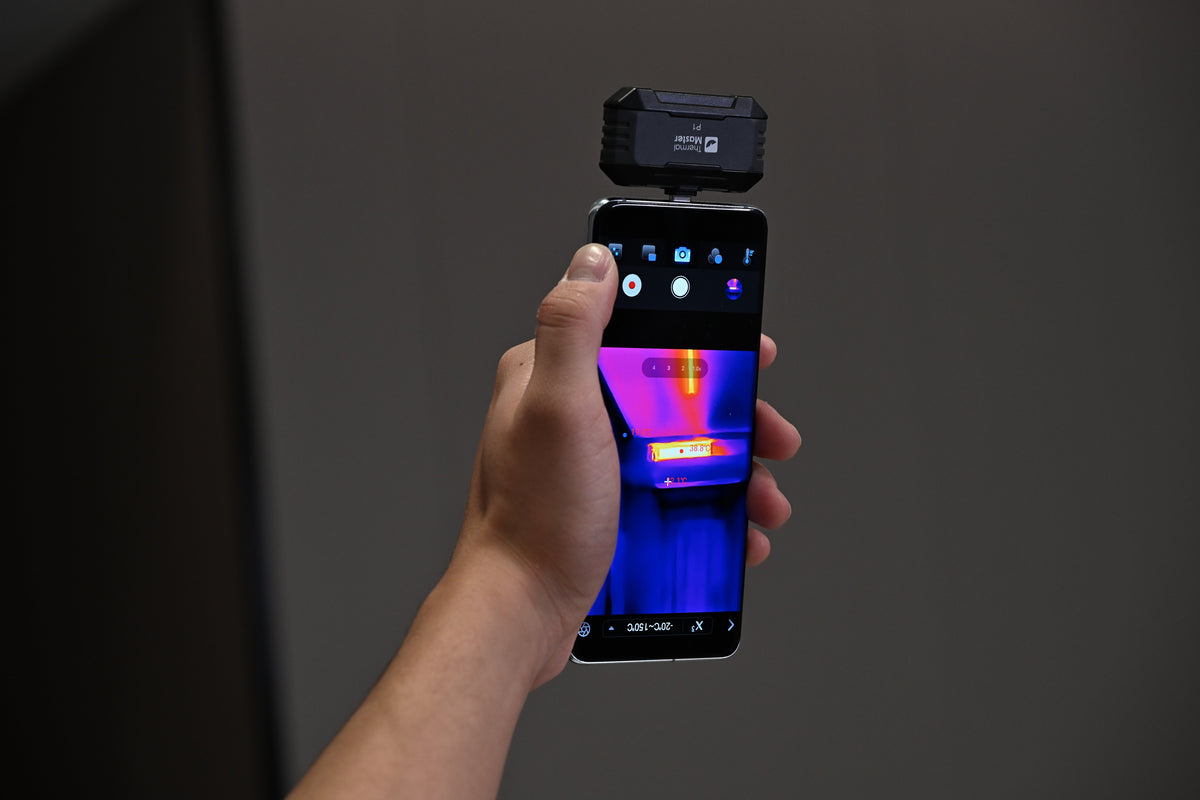
A thermal camera for home inspection can help find areas where cold air may be entering your home. Drafts are often linked to small gaps around windows, doors, and other parts of the building that are difficult to spot by eye.
Before adding more heating or replacing anything, it helps to find where the cold spots are and understand what may be causing them.
Where Does the Cold Air Usually Enter?
Windows and frames: Old seals, gaps around the frame, or poor sealing can let cold air in and lower the surface temperature nearby.
Doors and frames: Gaps along the bottom, sides, or frame of a door are common places for cold air to enter during winter.
Walls and joints: Exterior walls, wall joints, and areas where different building materials meet can have uneven insulation or unusual temperature patterns.
Pipe and electrical openings: Gaps around pipes and electrical cables where they pass through walls can also become entry points for cold air.
How Can Thermal Imaging Find Drafty Areas?

When checking a home with a thermal camera for home inspection, pay particular attention to window frames, sills, door bottoms, corners, pipe openings, and electrical openings. Moving the thermal camera along these areas can make it easier to spot places that are noticeably colder.
A clearer thermal image helps you see the range and edges of a cold area, while higher thermal sensitivity helps reveal subtle temperature differences, making less obvious cold spots easier to identify.
What Drafty Areas Can the P1 Help Find?
Newly Replaced Windows Still Have Draft Problems
In one home thermal-imaging survey, recently replaced uPVC windows still had noticeable cold areas around some frames. Further inspection found detached silicone sealant and gaps between the window frames and the surrounding wall.
For a similar inspection, the Thermal Master P1 can work as a thermal camera for home inspection, scanning the glass, frame, sill, and nearby wall instead of checking only the window itself. Its enhanced 320×240 thermal resolution provides a clearer, more detailed view of temperature patterns, making it easier to distinguish a narrow cold area around the frame from the warmer wall around it.
The P1 also has a NETD below 40 mK, which helps it pick up subtle temperature differences. This can be useful when a sealing problem creates only a small change in surface temperature that may not stand out to the naked eye.

A Noticeably Colder Area Under the Front Door
A front door can be another useful place to investigate when you can feel cold air around your feet. In one home thermal-imaging survey, the area around the bottom of the door was noticeably colder, with the temperature dropping to about 10°C.
Using the P1 as a thermal camera for home inspection, you can move it along the bottom edge and around the door frame to compare the colder area with the surrounding wall and floor. Its 25 Hz refresh rate keeps the thermal image smoother while you move the camera, making it easier to quickly follow temperature changes as you scan.
One Room Stays Colder Than the Others
Sometimes there is no obvious draft at all. You may simply notice that one room stays colder than the rest of the house.
A home thermal-imaging survey in Cornwall found several sources of cold areas, including missing insulation above upstairs windows, air entering around window frames, and cold air moving through gaps around a kitchen pipe box.
For this type of inspection, the P1 can be used as a thermal camera for home inspection to compare different parts of the room and look for areas that stand out from their surroundings.

A Practical First Check for Winter Drafts

Thermal Master P1 is a compact phone thermal camera for quick checks around the home. It can help homeowners scan windows, doors, walls, and other areas when a room feels unusually cold.
Instead of checking the entire house at random, you can use the P1 to quickly narrow down where the colder areas are and decide which spots need a closer look. Its small size also makes it easy to keep on hand for routine checks during the colder months, especially if you want a thermal camera for home inspection that connects directly to your phone.
Read More
Thermal Master P1 vs FLIR ONE Pro: Which Smartphone Thermal Camera Is
How Do You Repair a Heating System with a Thermal Camera?
How to Use a Thermal Camera for Home Inspection?
How to Reduce Heat Loss in a House?
Thermal Camera for Home Inspections: How to cut down your energy bills


コメントを書く
全てのコメントは、掲載前にモデレートされます
このサイトはhCaptchaによって保護されており、hCaptchaプライバシーポリシーおよび利用規約が適用されます。