



Wärmebildkameras können Wärmequellenmuster sichtbar machen, die für das menschliche Auge unsichtbar sind, wodurch sie in der Detektion, Sicherheit und bei Anwendungen im Freien sehr nützlich sind. Aber wie genau funktionieren sie?
Im Folgenden erklären wir, wie Wärmebildkameras Wärme erkennen, Wärmebilder erzeugen und welche Faktoren ihre Leistung beeinflussen.
Wofür wird eine Wärmebildkamera verwendet?
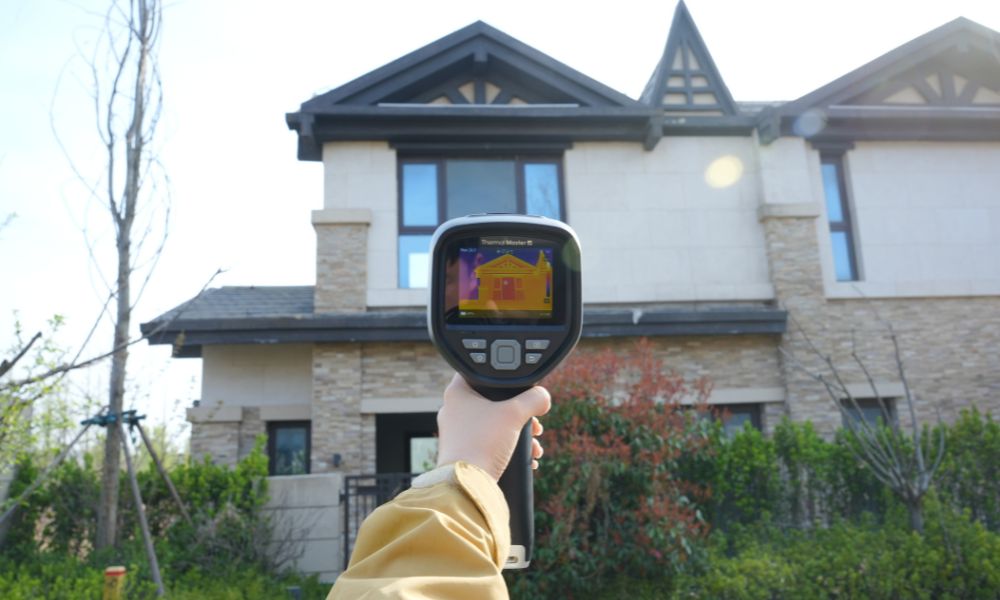
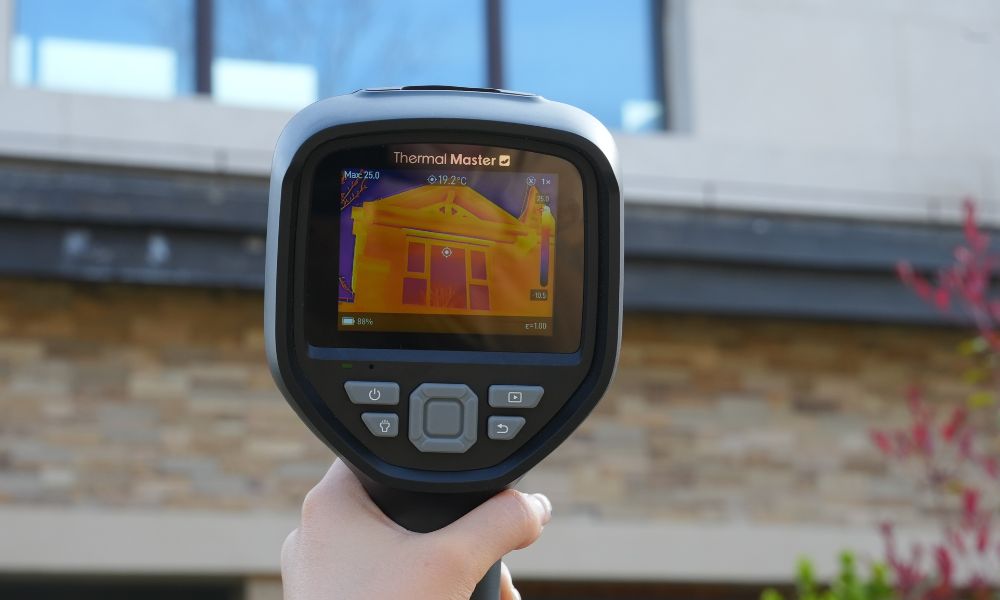
Wärmebildkameras werden häufig bei Hausinspektionen eingesetzt, bei elektrischen und baulichen Überprüfungen, um Überhitzung, Wärmeverlust, Luftlecks und versteckte Feuchtigkeit zu identifizieren; sie werden auch häufig in der Kfz-Diagnose verwendet, um Probleme mit Motor, Bremsen und elektrischen Systemen zu erkennen.
Darüber hinaus werden sie in der Sicherheitsüberwachung eingesetzt, um Personen oder Tiere im Dunkeln zu erkennen, sowie bei der Jagd und Wildbeobachtung, bei der Brandbekämpfung und bei Such- und Rettungseinsätzen, um Personen und gefährliche Hotspots zu identifizieren.
Wie funktionieren Wärmebildkameras?
Wärmebildkameras funktionieren, indem sie die von Objekten ausgestrahlte Infrarotstrahlung erfassen und Temperaturunterschiede in ein klares, sichtbares Bild umwandeln. Dies ermöglicht ihnen, auch bei Dunkelheit und schlechten Sichtverhältnissen normal zu funktionieren. Nachfolgend finden Sie eine detaillierte Erklärung, wie Wärmebildgebung funktioniert:
Infrarotstrahlungsdetektion
Jedes Objekt strahlt aufgrund seiner eigenen Temperatur Infrarotenergie aus, die für das menschliche Auge unsichtbar ist. Wärmebildkameras können diese unsichtbare Wärme kontinuierlich erfassen und arbeiten auch bei völliger Dunkelheit, Rauch oder Smog.
Infrarot-Linsenfokussierung
Einige Infrarotlinsen sammeln thermische Energie und fokussieren sie auf einen Sensor. Im Gegensatz zu Standardglaslinsen sind sie so konzipiert, dass sie Infrarotwellenlängen durchlassen und so genaue und zuverlässige Temperaturmessungen gewährleisten.
Wärmesensor-Konvertierung
Der Kernbestandteil eines Wärmebildgeräts ist der Wärmesensor, typischerweise ein Mikrobolometer, der winzige Temperaturänderungen erfasst und in elektrische Signale umwandelt. Jeder Pixel entspricht einer bestimmten Temperatur, wodurch die Rohdaten für das Wärmebild erzeugt werden.
Bildverarbeitung
Der Prozessor des Wärmebildgeräts analysiert diese Signale, korrigiert Temperaturunterschiede und kalibriert, um ein stabiles, klares Bild zu erzeugen, das die thermischen Verteilungsmuster der realen Welt widerspiegelt.
Bildanzeige
Schließlich werden die thermischen Daten in Farbe oder Graustufen auf dem Bildschirm angezeigt. Wärmere Bereiche erscheinen heller, kühlere Bereiche dunkler, wodurch Temperaturunterschiede sichtbar werden.

Wie erkennen Wärmebildkameras Wärme?
Wärmebildkameras erfassen Wärme, indem sie die von Objekten emittierte Infrarotstrahlung und nicht das sichtbare Licht detektieren. Jedes Objekt mit einer Temperatur über dem absoluten Nullpunkt sendet natürlich Infrarotenergie aus, deren Menge mit der Temperatur variiert. Wärmebildkameras nutzen diese Infrarotstrahlung, um Wärme zu identifizieren.
Anstatt einfach nur die Temperatur zu messen, erfasst ein Wärmebildgerät den Unterschied der Infrarotenergie zwischen einem Objekt und seiner Umgebung. Ein Wärmesensor (am häufigsten ein Mikrobolometer) reagiert auf diese Energieänderungen und wandelt sie in temperaturbezogene Daten um. Diese thermische Detektion erfolgt vor jeder Bildverarbeitung und liefert Rohdaten, die dann zur Erzeugung eines Wärmebildes verwendet werden.
Wie wird Infrarotstrahlung in ein Wärmebild umgewandelt?
Infrarotstrahlung wird durch eine Reihe von Schritten in ein Wärmebild umgewandelt, wobei unsichtbare Wärme mithilfe eines Mikrobolometer-basierten Sensors in ein klares, lesbares Bild umgewandelt wird. Hier ist ein kurzer Überblick:
- Erkennung des Infrarotsignals: Die Kamera detektiert zunächst die von Objekten in der Szene emittierte Infrarotenergie. Unterschiedliche Energieniveaus spiegeln Temperaturunterschiede im Bild wider.
- Signalkonvertierung in Daten: Der Sensor wandelt dann die Infrarotenergie in elektrische Signale um. Jeder Teil des Sensors registriert die empfangene Wärme und erzeugt temperaturbezogene Daten.
- Datenverarbeitung und Kalibrierung: Der Prozessor der Kamera bereinigt und analysiert die Rohdaten, reduziert Rauschen und kalibriert sie, um eine genaue Darstellung der Temperaturunterschiede zu gewährleisten.
- Farb- und Helligkeitszuordnung: Die verarbeiteten Daten werden in visuelle Farbtöne oder Farben umgewandelt. Wärmere Bereiche erscheinen heller und intensiver, während kühlere Bereiche dunkler und weniger deutlich erscheinen.
- Anzeige des Wärmebildes: Schließlich präsentiert die Kamera diese Informationen als Wärmebild, wodurch die Wärmeverteilung, der Temperaturkontrast und Hotspots leicht erkennbar werden.
Was sind die Hauptbestandteile einer Wärmebildkamera?
Ein Wärmebildgerät besteht aus mehreren Schlüsselkomponenten, die zusammenarbeiten, um Wärme zu erkennen und klare Wärmebilder zu erzeugen. Es folgt eine detaillierte Beschreibung:
Infrarotlinse
Die Infrarotlinse sammelt die von Objekten abgegebene Wärme und überträgt sie auf den Sensor. Die Infrarotlinse besteht aus speziellen Materialien und lässt die Infrarotstrahlung präzise durch.
Wärmesensor (Mikrobolometer)
Dies ist der Kernbestandteil des Wärmebildgeräts. Es erkennt winzige Unterschiede in der Infrarotenergie und wandelt sie in elektrische Signale um, die Temperaturänderungen anzeigen.
Bildprozessor
Der Prozessor analysiert die Sensordaten, führt Kalibrierung und Rauschunterdrückung durch und wandelt die Temperaturinformationen in ein nutzbares Bildformat um. Dies gewährleistet stabile, klare und leicht interpretierbare Wärmebilder.
Anzeige
Das Display zeigt das verarbeitete Wärmebild in Farbe oder Graustufen an, sodass Sie die Wärmeverteilung, den Temperaturkontrast und Hotspots in Echtzeit anzeigen können.
Stromversorgung und Gehäuse
Die Batterie versorgt das Wärmebildgerät mit Strom, und das Gehäuse schützt die internen Komponenten je nach Verwendungszweck vor hohen Temperaturen, Staub, Feuchtigkeit und Stößen.
Was beeinflusst die Leistung von Wärmebildkameras?
- Thermische Auflösung: Eine höhere Auflösung macht Details und kleine Hotspots deutlicher sichtbar. Umgekehrt neigen nahe beieinander liegende Temperaturunterschiede dazu, unscharf zu werden.
- Thermische Empfindlichkeit (NETD): Die Empfindlichkeit bestimmt den kleinsten Temperaturunterschied, den eine Kamera erkennen kann. Je niedriger der NETD-Wert, desto subtilere thermische Änderungen kann die Kamera erfassen.
- Oberflächenemissionsgrad: Nicht alle Materialien strahlen Wärme auf die gleiche Weise ab. Zum Beispiel reflektieren glänzende oder reflektierende Oberflächen wie Metalle Umgebungswärme; falsche Emissionsgrad-Einstellungen können zu ungenauen Messwerten führen.
- Entfernung zum Ziel: Je größer die Entfernung, desto schwieriger ist es, thermische Details zu erkennen. Kleine oder weit entfernte Objekte können selbst mit niedrigauflösenden Kameras unscharf erscheinen.
- Umgebungsbedingungen: Faktoren wie Regen, Nebel, hohe Luftfeuchtigkeit oder Rauch können die Infrarotstrahlung stören und die Bildschärfe sowie die effektive Reichweite reduzieren.
- Kameraeinstellungen und Kalibrierung: Falsche Einstellungen oder eine unsachgemäße Kalibrierung können die Genauigkeit und Bildqualität beeinträchtigen. Richtige Einstellungen stellen sicher, dass Wärmebilder die tatsächlichen Temperaturunterschiede widerspiegeln.
Was sind die gängigen Typen von Wärmebildkameras?
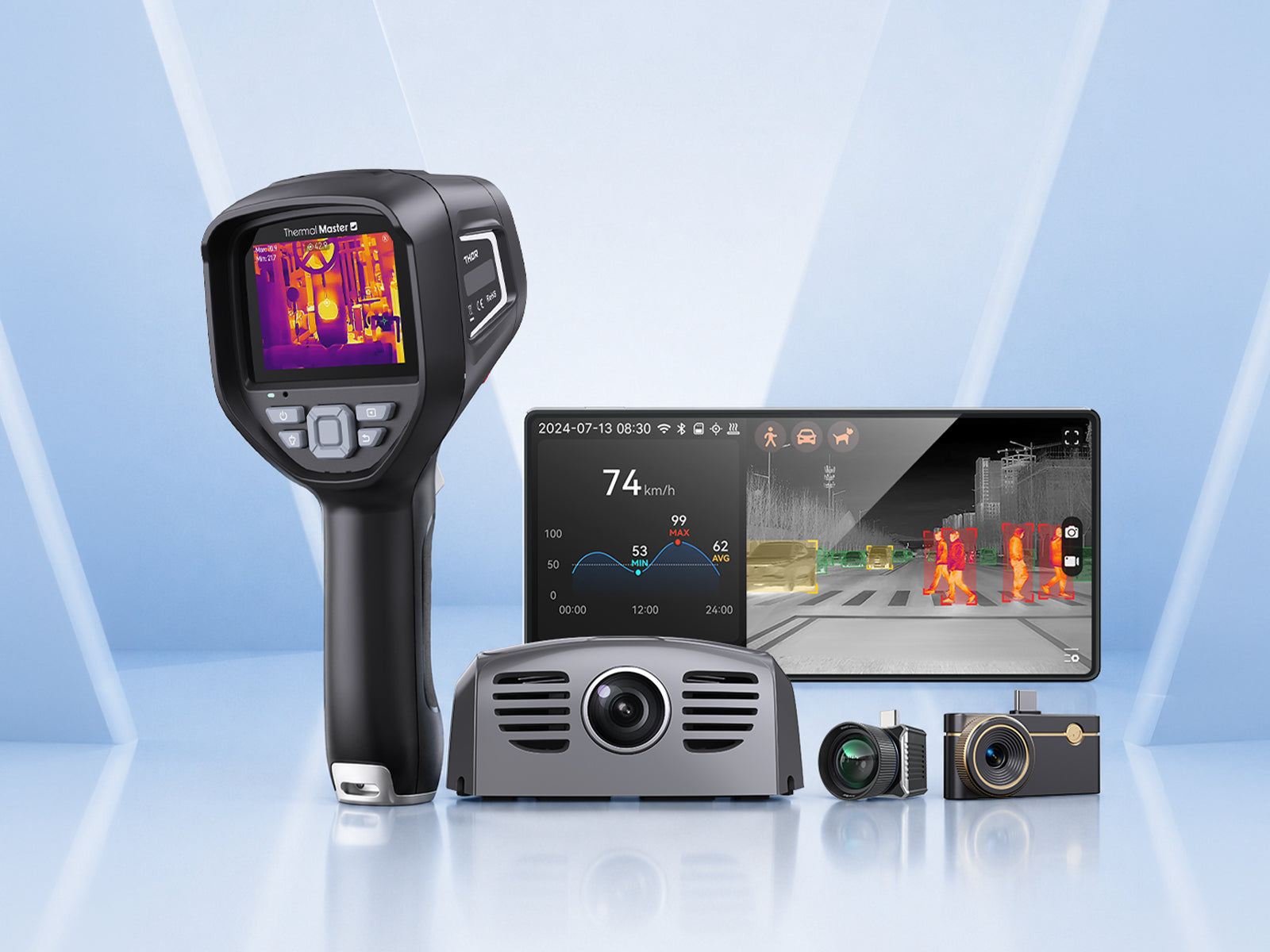
Wärmebildkameras gibt es in verschiedenen Ausführungen, die jeweils für bestimmte Aufgaben und Umgebungen konzipiert sind. Im Folgenden sind einige gängige Typen aufgeführt:
- Handgehaltene Wärmebildkameras:Handgehaltene Wärmebildkameras werden häufig für elektrische Inspektionen, Bauinspektionen, Wartungsarbeiten und allgemeine Fehlerbehebung eingesetzt. Sie sind einfach zu bedienen und sowohl für Profis als auch für erfahrene Benutzer geeignet.
- Smartphone-Wärmebildkameras:Wärmebildkameras für Telefone sind klein und leicht und werden an ein Smartphone angeschlossen, um als Wärmebildgerät zu fungieren. Sie können für schnelle Inspektionen, Heimwerkerprojekte und alltägliche Aufgaben verwendet werden.
- Wärmebildzielgeräte: Wärmebildzielgeräte können für die Jagd, Wildbeobachtung und Outdoor-Aktivitäten verwendet werden und helfen Ihnen, Tiere anhand ihrer Körpertemperatur zu lokalisierung.
- Feste oder wandmontierte Wärmebildkameras: Diese Wärmebildkameras werden an einem festen Ort zur kontinuierlichen Überwachung installiert. Sie eignen sich für Industrieumgebungen, Sicherheitssysteme und Infrastrukturüberwachung, wo eine 24/7-Wärmebildbeobachtung erforderlich ist.
- Drohnenmontierte Wärmebildkameras: Diese Kameras werden auf Drohnen montiert, um große oder schwer zugängliche Bereiche wie Dächer, Solarmodule und weite Außenbereiche sowie für Such- und Rettungseinsätze zu inspizieren.

Die richtige Wärmebildkamera für Ihre Bedürfnisse auswählen
Die Wahl der richtigen Wärmebildkamera hängt wirklich davon ab, wie Sie sie verwenden möchten. Inspektionsaufgaben profitieren oft von einer besseren Auflösung und Empfindlichkeit, während der Einsatz im Freien oder in der Sicherheit meist mehr Wert auf Reichweite, Tragbarkeit und einfache Handhabung legt.
Wenn Sie nach einer zuverlässigen Option suchen, bietet Thermal Master eine Vielzahl von Wärmebildkameras an, von kompakten Modellen für schnelle Überprüfungen bis hin zu fortschrittlicheren Geräten für den professionellen oder Outdoor-Einsatz, um die Suche nach dem passenden Modell zu erleichtern.
Fazit
Wärmebildkameras funktionieren, indem sie Infrarotstrahlung erfassen und Temperaturunterschiede in Bilder umwandeln, die wir sehen können. Das Verständnis, wie sie Wärme erkennen, Wärmebilder erstellen und was ihre Leistung beeinflusst, hilft Ihnen, Wärmebildkameras effektiver zu nutzen und die richtige für Ihre Bedürfnisse auszuwählen.
FAQs
Wie arbeiten Wärmebildkameras mit dem Emissionsgrad?
Wärmebildgeräte erfassen die von Objekten ausgestrahlte Infrarotenergie und verwenden den Emissionsgrad, um die Effizienz der Energieemission von der Objektoberfläche zu bestimmen. Durch die Einstellung eines Emissionsgradwertes wandelt das Wärmebildgerät die erfasste Strahlung in eine Temperaturanzeige um, aber die Ergebnisse können ungenau sein, wenn der Emissionsgradwert nicht mit dem Material des Objekts übereinstimmt.
Kann ich mein Telefon als Wärmebildkamera verwenden?
Ja, Sie können Ihr Telefon als Wärmebildkamera verwenden, indem Sie ein kompatibles Wärmebildzubehör anbringen, das es Ihrem Telefon ermöglicht, Wärmemuster zu erkennen und Wärmebilder anzuzeigen.
Wie sehen Wärmebildkameras die Temperatur?
Wärmebildkameras zeigen die Temperatur an, indem sie Infrarotstrahlung erfassen und Temperaturunterschiede als hellere oder dunklere Bereiche darstellen. Wärmere Objekte geben mehr Infrarotenergie ab, kühlere Objekte weniger.

Hinterlasse einen Kommentar
Alle Kommentare werden vor der Veröffentlichung geprüft.
Diese Website ist durch hCaptcha geschützt und es gelten die allgemeinen Geschäftsbedingungen und Datenschutzbestimmungen von hCaptcha.