



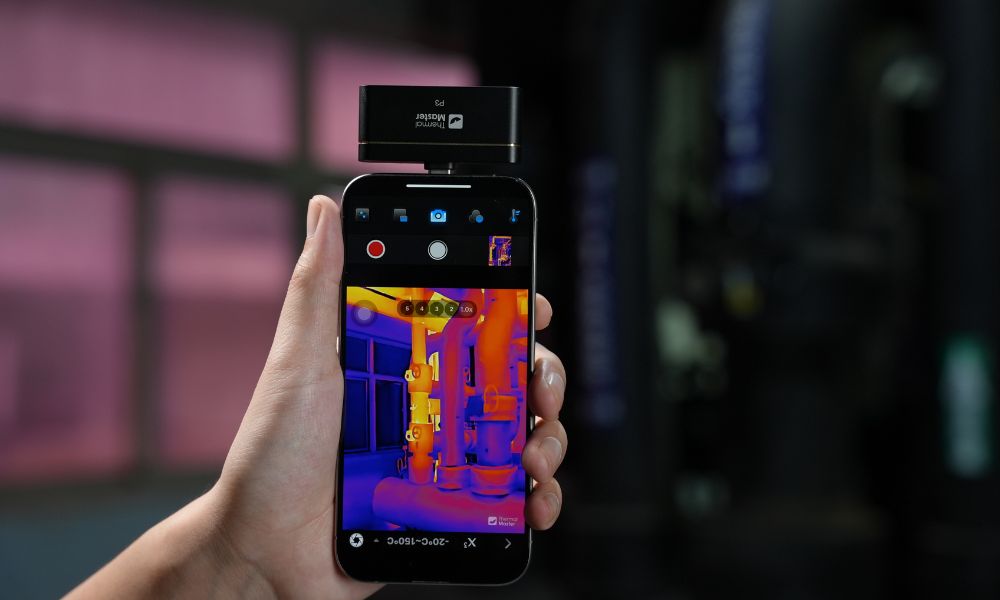
No, iPhones do not come with built-in thermal cameras. You can use your iPhone for thermal imaging by connecting an external thermal camera accessory. Now, we’ll explain why iPhones don’t have thermal cameras, how to turn your iPhone into a thermal imager, and which devices are best suited for your needs.
Why Don’t iPhones Have Thermal Cameras?
Most modern smartphones lack thermal imaging capabilities, and previous iPhone designs did not include such sensors. Thermal imaging cameras rely on specialized infrared sensors that detect heat rather than visible light, which is a fundamental difference from smartphone cameras.
Adding a thermal imaging sensor would increase costs, power consumption, and the space required inside the device. On the other hand, thermal imaging is primarily used in specialized scenarios such as electrical inspections or HVAC diagnostics, so Apple believes it is more appropriate to leave this to external devices that can provide more accurate results.
Can an iPhone Camera Work Like a Thermal Camera?
The iPhone’s camera cannot function like a thermal imager. This is because standard smartphone cameras capture visible light, whereas thermal imaging relies on infrared sensors to detect temperature differences. Even with advanced features like “Night Mode” or LiDAR, the iPhone cannot measure or visualize temperatures in the same way a thermal imager does.
Although some apps claim to simulate thermal imaging effects, they simply apply color filters to standard images and cannot provide accurate thermal data. If you need to perform tasks such as electrical inspections, leak detection, or equipment diagnostics that require precise temperature measurement, it is best to use an external thermal imager.

Where is the Thermal Camera on an iPhone?
The iPhone's thermal imaging capability isn't built into the device itself but is enabled by an external thermal imaging camera. These cameras connect directly to the phone via the charging port and, when used with a thermal imaging app, can capture and display real-time thermal imaging data.
Most iPhones equipped with a USB-C port support plug-and-play connectivity with thermal imaging cameras, while older models with a Lightning port may require an adapter. Once connected, you can use a dedicated app to view thermal images, measure temperatures, and analyze heat distribution directly on the screen.
How Can You Turn Your iPhone into a Thermal Camera?
With an external thermal imaging accessory, you can turn your iPhone into a thermal imager. These accessories plug directly into your iPhone and, when paired with a dedicated app, display real-time thermal images and temperature data.
1. Compatible Thermal Imaging Accessories
Choose devices designed specifically for iPhone compatibility. Models starting with the iPhone 15 support USB-C ports, while iPhone 14 or earlier models may require a Lightning adapter. Be sure to check compatibility, resolution, and temperature range to ensure the device meets your needs.
2. Connect via the Charging Port
Plug the thermal imaging accessory into the iPhone’s charging port to establish a direct connection. Many models on the market support plug-and-play functionality—such as the Thermal Master thermal imager—allowing you to start using it immediately without additional setup or an external power source, making them ideal for on-site inspections.
3. Install and Open the Companion App
Download the app provided by each thermal camera brand to access the full functionality of the device. The app allows you to view thermal images in real time, switch color palettes, adjust temperature settings, and capture photos or videos for later analysis.
4. Start scanning and analyzing heat sources
Once set up, you can begin scanning surfaces or equipment to detect temperature variations. You can use this in everyday scenarios to help identify issues such as electrical overheating, insulation problems, water leaks, or inefficient HVAC systems. Then, take corrective action based on the severity of the problem.
What Are the Best iPhone Thermal Camera Options?
iPhone thermal imaging cameras are not only useful in everyday life but can also be used for electrical inspections, component testing, and home inspections. To this end, Thermal Master offers three thermal imaging camera accessories designed for the iPhone.
Thermal Master P1 (Repair Master)
Thermal Master P1 is a compact smartphone thermal imager designed for everyday inspection tasks. With its lightweight design and plug-and-play setup, it quickly transforms your iPhone into a practical thermal imaging tool, ideal for home use, DIY diagnostics, and basic troubleshooting.
Key Features
- Infrared resolution: 160 × 120, enhanced to 320 × 240 with X³IR technology for clearer thermal imaging.
- Thermal Sensitivity (NETD): ≤40 mK, capable of detecting typical temperature differences.
- Measurement Accuracy: ±2°C, suitable for everyday inspection tasks.
- Temperature Range: -20°C to 600°C, covering most household and electrical scenarios.
- Energy Efficiency: Ultra-low power consumption (approx. 0.32 W), no additional batteries required.
Thermal Master P2 Pro (World's Smallest Thermal Camera)
Thermal Master P2 Pro combines portability with professional-grade performance. It is ideal for work scenarios requiring more precise diagnostics, allowing users to detect subtle temperature changes directly via an iPhone, and providing clearer thermal imagery and more reliable results for tasks such as electrical inspections and equipment troubleshooting.
Key Features
- Infrared Resolution: 256 × 192, upgradable to 512 × 384 with X³IR technology
- Thermal Sensitivity (NETD): ≤40 mK, capable of detecting subtle thermal differences.
- Measurement Accuracy: ±1.5°C, providing higher precision for diagnostics.
- Macro Function: Equipped with a magnetic 8mm macro lens, suitable for close-up inspections (PCBs, components).
- Refresh Rate: 25 Hz, providing smooth real-time thermal imaging.
Thermal Master P3 (PCB Master)
Thermal Master P3 is equipped with a manual focus optical system, allowing you to control image clarity at various distances. Additionally, it offers higher sensitivity and flexible focusing capabilities, making it ideal for electronic device repair, HVAC diagnostics, and precision inspection tasks.
Key Features
- Infrared Resolution: 256 × 192, upgradable to 512 × 384 via X³IR image processing technology.
- Exceptional Sensitivity (NETD): ≤35 mK, capable of detecting extremely subtle thermal anomalies.
- Measurement Accuracy: ±2°C or ±2%, suitable for professional inspection environments.
- Manual Focus Lens: 8 mm manual focus with an adjustable focus range from 8 cm to 80 m.
- Construction: Rugged aluminum housing ensures stable performance in challenging environments.

Product Comparison Table for Thermal Master
Below is a comparison chart of the specifications for Thermal Master’s three iPhone thermal imaging cameras. It allows you to quickly see the differences between each model at a glance, helping you choose the one that best suits your needs.
|
Attribute |
Thermal Master P1 |
Thermal Master P2 Pro |
Thermal Master P3 |
|
IR Resolution |
160×120 (320×240 enhanced) |
256×192 (512×384 enhanced) |
256×192 (512×384 enhanced) |
|
NETD |
~40mK |
≤40mK |
≤35mK |
|
Accuracy |
±2°C |
±1.5°C |
±2°C (approx) |
|
Focus Type |
Fixed focus |
Fixed + macro lens |
Manual focus |
|
Temperature Range |
-20°C ~ 600°C |
-20°C ~ 600°C |
-20°C ~ 600°C |
|
Refresh Rate |
25Hz |
25Hz |
25Hz |
|
Best Use |
Home / DIY checks |
Electrical / PCB / detailed inspection |
HVAC / industrial / advanced use |
|
Portability |
Very compact |
Ultra-compact (~9g) |
Compact |
Summary
Although the iPhone doesn’t come with a built-in thermal imaging camera, you can easily use thermal imaging capabilities by connecting an external device. With the right device, your iPhone can perform tasks such as electrical inspections, heat loss detection, and equipment diagnostics. Whether you need basic inspections or more precise analysis, there’s a thermal imaging camera option to suit your needs.
FAQ
Does the iPhone 15 or 16 have thermal imaging?
No, the iPhone 15 and iPhone 16 do not have built-in thermal imaging capabilities. However, you can connect an external thermal imaging camera to your iPhone to create a thermal imaging detection tool and use thermal imaging features.
Can I use my smartphone as a thermal camera?
Yes, you can use a smartphone as a thermal imager, but you’ll need an external thermal imaging accessory. Since smartphones don’t have built-in thermal sensors, you’ll need a compatible device that connects to your phone to capture accurate thermal data and display thermal images.
How accurate are iPhone thermal cameras?
When used with high-quality external thermal imaging accessories, the iPhone’s thermal imaging feature offers high accuracy, typically ranging from ±1.5°C to ±2°C, depending on the device model. However, accuracy may vary depending on factors such as the thermal imager’s sensitivity, calibration status, and environmental conditions. Its reliability makes it suitable for tasks such as electrical inspections, heat loss detection, and equipment diagnostics.
Related Reading:



Hinterlasse einen Kommentar
Alle Kommentare werden vor der Veröffentlichung geprüft.
Diese Website ist durch hCaptcha geschützt und es gelten die allgemeinen Geschäftsbedingungen und Datenschutzbestimmungen von hCaptcha.